<?xml version="1.0" encoding="UTF-8" ?>
<feed xml:lang="ja" xmlns="http://www.w3.org/2005/Atom" xmlns:dc="http://purl.org/dc/elements/1.1/" xmlns:thr="http://purl.org/syndication/thread/1.0">
  <title type="text">あつ x Windows x Ubuntu</title>
  <subtitle type="html"></subtitle>
  <link rel="self" type="application/atom+xml" href="http://wibuntu.janken-pon.net/atom"/>
  <link rel="alternate" type="text/html" href="http://wibuntu.janken-pon.net/"/>
  <updated>2013-05-26T16:43:02+09:00</updated>
  <author><name>あつ</name></author>
  <generator uri="//www.ninja.co.jp/blog/" version="0.9">忍者ブログ</generator>
  <atom10:link xmlns:atom10="http://www.w3.org/2005/Atom" rel="hub" href="http://pubsubhubbub.appspot.com/" />
  <entry>
    <id>wibuntu.janken-pon.net://entry/3</id>
    <link rel="alternate" type="text/html" href="http://wibuntu.janken-pon.net/%E8%B3%87%E6%A0%BC/%E3%83%87%E3%83%BC%E3%82%BF%E3%83%99%E3%83%BC%E3%82%B9%E3%82%B9%E3%83%9A%E3%82%B7%E3%83%A3%E3%83%AA%E3%82%B9%E3%83%88%E3%81%AE%E3%81%8A%E3%81%99%E3%81%99%E3%82%81%E5%8F%82%E8%80%83%E6%9B%B8" />
    <published>2013-07-13T23:45:56+09:00</published> 
    <updated>2013-07-13T23:45:56+09:00</updated> 
    <category term="資格" label="資格" />
    <title>データベーススペシャリストのおすすめ参考書</title>
    <content mode="escaped" type="text/html" xml:lang="utf-8"> 
      <![CDATA[４月に行われたデータベーススペシャリスト試験に初挑戦っ、無事に合格できました！<br />
<br />
振り返ってみてのおすすめ参考書（というか勉強に使ったもの）などを紹介を。<br />
勉強期間は１２月ごろからなので、だいたい４か月くらいです。<br />
<br />
【参考書】<br />
・<a href="http://bookstore.tac-school.co.jp/book/detail/04846/" title="" target="_blank">TAC　データベーススペシャリスト　合格テキスト</a><br />
<br />
【午前問題集】<br />
・<a href="http://www.tdupress.jp/books/isbn978-4-501-54860-5.html" title="" target="_blank">東京電機大学　データベーススペシャリスト　午前　試験問題集</a><br />
<br />
【午後問題集】<br />
・<a href="http://www.itec.jp/shop/products/detail.php?product_id=1936" title="" target="_blank">アイテック　データベーススペシャリスト 予想問題集</a><br />
・<a href="http://www.itec.jp/shop/products/detail.php?product_id=2210" title="" target="_blank">アイテック　徹底解説 データベーススペシャリスト 本試験問題</a><br />
・<a href="http://www.jitec.ipa.go.jp/1_04hanni_sukiru/_index_hanni_skill.html" title="" target="_blank">過去問題</a><br />
<br />
アイテックのホームページに、<a href="http://www.itec.co.jp/learner/download/index.html" title="" target="_blank">午後の解答用紙</a>があるのでおススメです。<br />
<br />
問題選択は<br />
午後１&rarr;問１と問２<br />
午後２&rarr;問２<br />
<br />
午後１、とにかく関数従属性と概念データモデルを（図を書くことも含めて）勉強することがポイントです。<br />
<br />
午後２、「<a href="http://www.wakuwakustudyworld.co.jp/blog/archives/2483" title="">わく☆すたブログ　データベーススペシャリスト試験　午後2問2</a>」に、<br />
奇数年の問２は概念データモデルと関係スキーマの作成になるとの情報が！<br />
そこで、その2つに絞って勉強しました。<br />
今回もほぼ法則通りだったので、功を奏したかな・・・と。<br />
<br />
午後の問題は、<a href="http://www.jitec.ipa.go.jp/1_04hanni_sukiru/_index_hanni_skill.html" title="" target="_blank">本家に置いてある過去問題</a>まで一通りやりました。<br />
<br />
しかし、この問題選択の仕方だとデータベース設計の試験ですね。<br />
データベース技術の勉強も、もっとしなければ<br />
<br />
ちなみに点数のほうは<br />
午前１　71.4<br />
午前２　76<br />
午後１　84<br />
午後２　90<br />
<br />
でした。マークシートに弱いっ！]]> 
    </content>
    <author>
            <name>あつ</name>
        </author>
  </entry>
  <entry>
    <id>wibuntu.janken-pon.net://entry/2</id>
    <link rel="alternate" type="text/html" href="http://wibuntu.janken-pon.net/windows%20x%20ubuntu/%E3%83%87%E3%83%A5%E3%82%A2%E3%83%AB%E3%83%96%E3%83%BC%E3%83%88%E3%81%A7%20firefox%20%E3%81%AE%E3%83%97%E3%83%AD%E3%83%95%E3%82%A1%E3%82%A4%E3%83%AB%E5%85%B1%E6%9C%89%E5%8C%96" />
    <published>2013-05-28T22:59:25+09:00</published> 
    <updated>2013-05-28T22:59:25+09:00</updated> 
    <category term="Windows x Ubuntu" label="Windows x Ubuntu" />
    <title>デュアルブートで Firefox のプロファイル共有化</title>
    <content mode="escaped" type="text/html" xml:lang="utf-8"> 
      <![CDATA[【やりたいこと】<br />
Windows と Ubuntu で Firefox を使うとき<br />
ブックマークなどの設定を共通で使う。<br />
<br />
【構成】<br />
パーテーションA Windows 8 (C)<br />
パーテーションB Ubuntu<br />
パーテーションC データドライブ (D)　←ここにプロファイルを保存する<br />
<br />
【手順】<br />
<b>・Windows 8 側</b><br />
①設定ファイルのある場所を開く。<br />
場所→（例）C:\ユーザー\（ユーザー名）\AppData\Roaming\Mozilla\Firefox\<br />
<br />
②Profilesフォルダの下にある「（英数字）.default」フォルダをデータドライブにコピーする。<br />
<br />
③profiles.ini を開き、次の編集する。<br />
[Profile0]の<br />
・<b>IsRelative の値を 1→0 にする</b><br />
・Path の値を データドライブにコピーしたProfilesフォルダのパスにする。<br />
　（例）Path=D:\（英数字）.default<br />
<br />
<b>・Ubuntu側</b><br />
データドライブの「（英数字）.default」フォルダを参照する<br />
①設定ファイルのある場所を開く。<br />
隠しファイルなのでユーザー名の直下に表示されていない場合は、<b>ctrl + H</b><br />
場所→（例）/ホーム/（ユーザー名）/.mozilla/firefox<br />
<br />
②profiles.ini を開き、windous と同様の編集する。<br />
[Profile0]の<br />
・<b>IsRelative の値を 1→0 にする</b><br />
・Path の値を データドライブにコピーしたProfilesフォルダのパスにする。<br />
　（例）Path=/media/データドライブ/（英数字）.default<br />
<br />
★Ubuntu の設定ファイルを使う場合は、Ubuntu の「（英数字）.default」フォルダを使う。<br />
<br />
<b><i>That's all !!</i></b><br />
<br />
【参考】<br />
・Firefox まとめサイト wiki<br />
<a href="http://firefox.geckodev.org/?%E3%83%97%E3%83%AD%E3%83%95%E3%82%A1%E3%82%A4%E3%83%AB" target="_blank">プロファイル</a>]]> 
    </content>
    <author>
            <name>あつ</name>
        </author>
  </entry>
  <entry>
    <id>wibuntu.janken-pon.net://entry/1</id>
    <link rel="alternate" type="text/html" href="http://wibuntu.janken-pon.net/windows%20x%20ubuntu/windows%208%20%E3%81%A8%20ubuntu%2012.04%20%E3%82%92" />
    <published>2013-05-26T17:00:29+09:00</published> 
    <updated>2013-05-26T17:00:29+09:00</updated> 
    <category term="Windows x Ubuntu" label="Windows x Ubuntu" />
    <title>windows 8 と Ubuntu 12.04 をデュアルブート【64bit】</title>
    <content mode="escaped" type="text/html" xml:lang="utf-8"> 
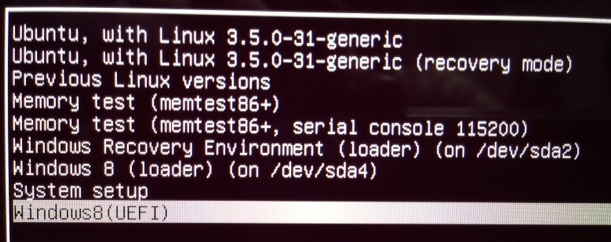
      <![CDATA[windows 8 の Boot Manager では Grub4dos を使って Ubuntu を起動できない・・・<br />そこで<br />Ubuntu から windows 8 を起動させてみる。<br /><br />【完成図】<br /><br /><img src="//wibuntu.janken-pon.net/File/001.jpg" alt="" /><br />一行目の Ubuntu ... で Ubuntu を、<br />最終行の Windows8(UEFI)  で Windows 8 を起動する。<br /><br />※Ubuntu インストールで作られる Windows 8 (loader) (on /dev/sda○)からは<b>起動できない</b><br /><br />【作業前】<br /><br />★パーテーション構成<br />0 EFI システムパーテーション　←今回のポイント。多分。。。<br />1 回復パーテーション<br />2 windows 8　←ここを縮小して Ubuntu をインストール<br />3 回復パーテーション<br /><br />★インストールOS<br />ubuntu-12.04.2-desktop-amd64<br /><br />【手順】<br /><br />◎ windows 8 のバックアップ…していおたほうが・・・。<br /><br /><b>① windows ボリュームの縮小</b><br /><br />・Ubuntu をインストールするスペースを空ける。<br /><br /><b>② Ubuntu のインストール</b><br /><br />★インストールの種類を「それ以外」に。<br /><br />★空き領域にパーテーションの作成<br />・swapパーテーション<br />→４GBぐらい。利用方法は「<b>スワップ領域</b>」<br />・インストールパーテーション<br />→好きなだけ。利用方法は「<b>ext4</b>」マウントポイントは「<b>/</b>」<br /><br />・ブートローダーのインストール先は <b>Ubuntu のインストールパーテーション</b><br /><br /><b>③ custom.cfgの作成</b><br /><br />・インストールが完了したら、Ubuntu を起動。<br /><br />★ /boot/grub/custom.cfg の作成<br /><br />#This entry should work for any version of Windows installed for UEFI booting<br />menuentry "Windows (UEFI)" {<br />search --set=root --file /EFI/Microsoft/Boot/bootmgfw.efi<br />chainloader /EFI/Microsoft/Boot/bootmgfw.efi<br />}<br /><br />（コマンドの説明）<br />------ 執筆中 ------<br /><br /><b>④ grub.cfgの再構成</b><br /><br />update-grub<br /><br />（コマンドの説明）<div>------ 執筆中 ------</div><br />再起動すると、Windows8(UEFI) があるはず。<br /><br /><u><i>That's all !!</i></u><br /><br />【参考】<br /><br />・人柱しないヒトバシラー<br /><a href="http://yabu3.blog76.fc2.com/blog-entry-428.html" target="_blank">Windows8とUbuntu 12.10のデュアルブート </a><br /><br />・技術者見習いの独り言<br /><a href="http://orumin.blogspot.jp/2013/01/grubefi.html" target="_blank">GRUBとEFIの組み合わせで使うときのメモ またはEFI全般のtips</a><br />windows 8 の Boot Manager で Grub4dos を使えない件について<br /><br />・taka8aru<br /><a href="http://taka8aru.blogspot.jp/2011/05/windowslinux-ubuntu-1104-grub2.html" target="_blank">taka8aru: WindowsのブートローダーでLinuxとデュアルブートする方法 - Ubuntu 11.04/12.04/12.10, Grub2の場合</a><br />Grub4dos を使う方法<br />]]> 
    </content>
    <author>
            <name>あつ</name>
        </author>
  </entry>
</feed>